Effectively using AI in SE
2025-10-08
Caveats
- I am learning as I go, as you are.
- Things have moved fast, and there are many tools to choose from.
- More effective models tend to cost more.
- I don’t believe AI will replace thinking.
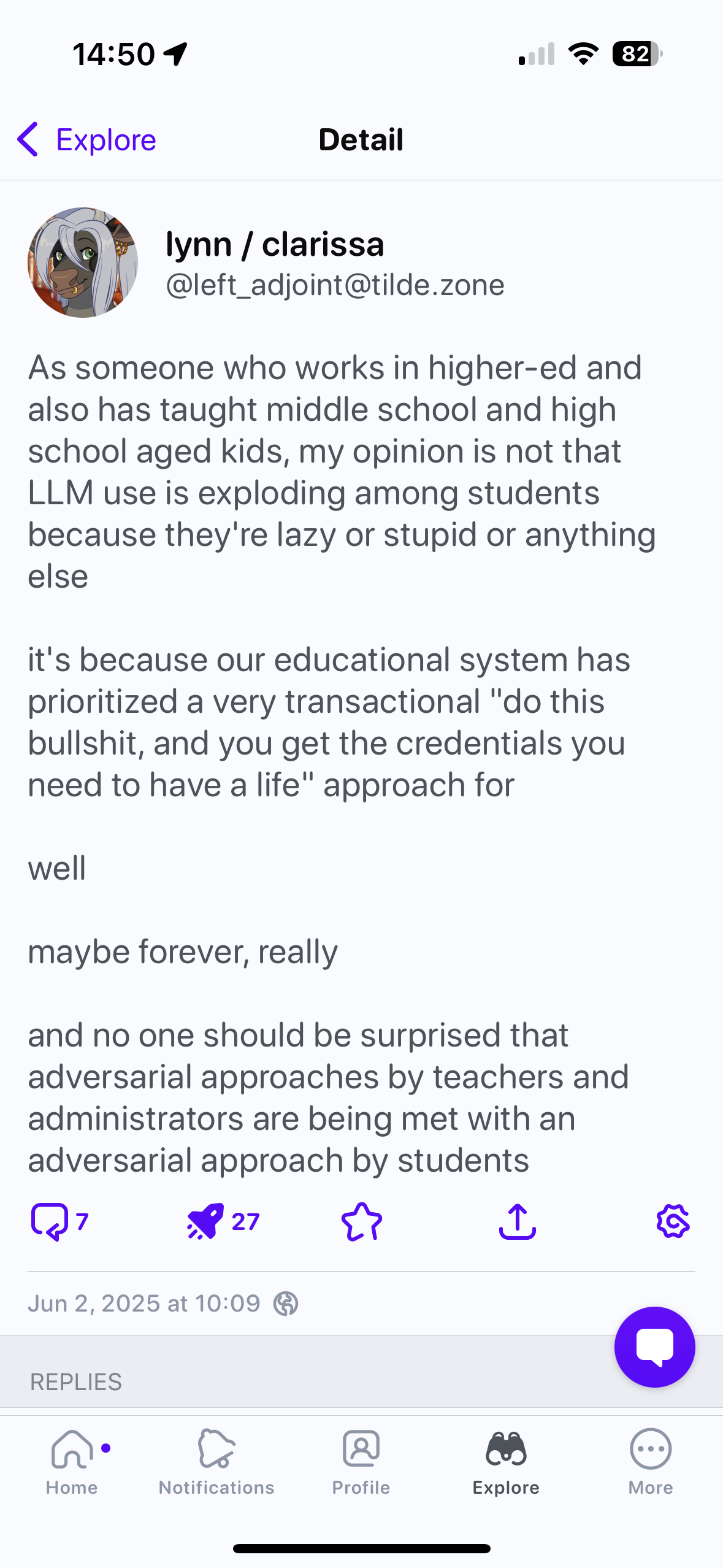
Contrarian Perspective


@hardin.bsky.social
How I use it:
- to answer questions for background I forgot or didn’t know
- to write scripts to manage notes and marks
- to code up answers to the exercises to test my questions
I do not use it to mark your assignments.
Policies
The University position statement does not say much either way about AI use.
What should the policy be?
How to Use AI as a Student/Developer
Simple is not Easy
(from https://substack.com/home/post/p-160131730)
Emphasize craftsmanship. There is a difference between what is “simple” and what is “easy”.
Simple is hard work. Vibe coding is easy.
AI rewards having a structured, careful development process.
A careful development approach
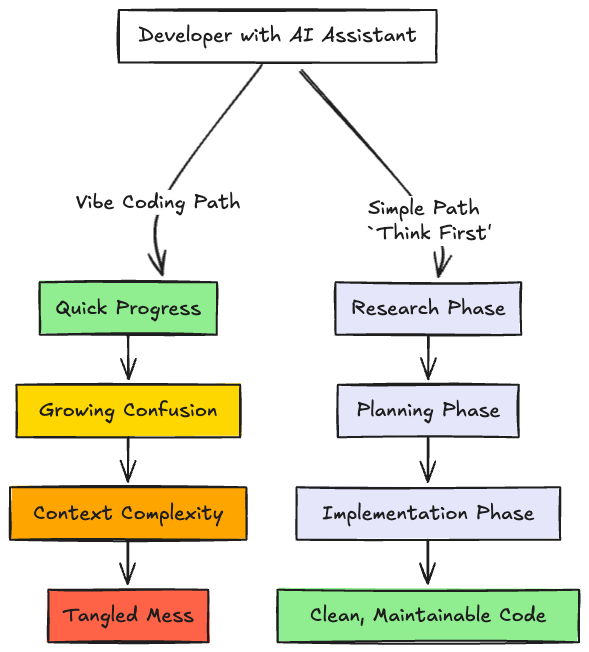
via https://www.arthropod.software
A Rational AI Design Process and How To Fake It
- Thinking hard and chatting about the problem and the changes you need to implement before doing anything
- Keeping components encapsulated with carefully-designed interfaces
- Controlling the scope of your changes; current AIs work best at the function or class level
A Rational AI Process (2)
- Testing and validation; how do you know your program works
- Good manual debugging skills (this was a major takeaway from the class - students found AI debugging to be unreliable)
- General system knowledge: networking, OS, data formats, databases
One Approach
Phase 1 Research and problem understanding.
Use the AI to map the codebase, identify dependencies, help you understand the problem.
It is key to leverage your insights here to keep the AI on track.
Phase 2 Planning as Design Thinking
Get the AI to create a detailed implementation plan, perhaps as a Markdown checklist.
Separates the what from the how.
Humans now conduct a thorough design review of the plan.
Here we apply our design skills looking for overly coupled components, poor modifiability, obvious design smells.
Phase 3 Implementation as Execution.
The AI translates the plan into code. Kent Beck suggests this only works if you have a rigorous test suite (i.e., TDD). The tools will optimize, which includes lying to you!
Design Cycle
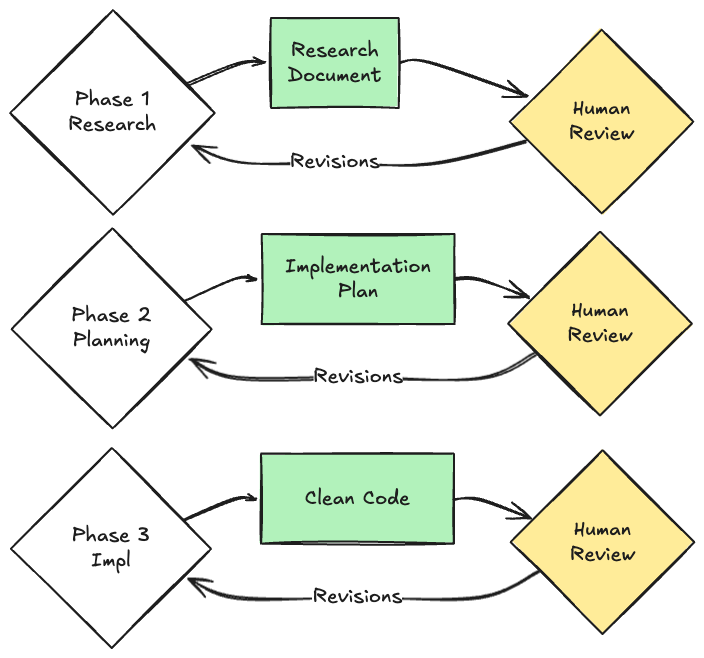
via arthropod.software
Practical advice
Steps
- Manage context with a global/project context file
- Prompt the AI with design questions and get a spec for the task you are working on.
- Revise the spec - ideally with 2 humans - and update it.
- Think about tests for the AI generated suggestions. How will you validate its answers?
- Generate code in small chunks, per task in the spec file.
- Test the code, repeat 4-6.
Prompt files/context
You should create a project-wide context.md file (in Copilot)
In your project/repo root, create .github/copilot-instructions.md
What goes into that file?
- coding conventions
- rules around scope of suggested changes
- potential tech stack restrictions
- context on your team as learners (do you know a LOT of javascript?)
Example prompt.md files
Generating a spec
Use the AI to brainstorm/delineate steps in the building process. Give it your project context AND your team’s context (skills, gaps). Work one step at a time.
Then:
Now that we’ve wrapped up the brainstorming process, can you compile our findings into a comprehensive, developer-ready specification? Include all relevant requirements, architecture choices, data handling details, error handling strategies, and a testing plan so a developer can immediately begin implementation. Write this to the file
spec.md.
Moving to Implementation
Get your team mates to check the proposed spec. You can also potentially ask other LLMs to revise it for you.
Then ask the AI to create a detailed set of implementation steps. Save this as something like prompt-plan.md. Add a todo.md file to let the AI check steps off as it finishes them.
Implement and Test
Paste the prompts into Copilot CLI. It uses the Claude Sonnet 4.5 model currently, so you could also use Aider, Claude, etc.
Aside: model vs tool distinction.
Verifying outputs
You need a way to confirm the code does what you want/hope.
Get the AI - maybe a different one - to create some (integration) tests for what you are looking for.
Always ask for tests as part of the normal AI workflow, but keep the integration tests apart (read: no shared context).
Kent Beck: Warning Signs
What were the warning signs that told you the AI was going off track?
- Loops.
- Functionality I hadn’t asked for (even if it was a reasonable next step).
- Any indication that the [AI] was cheating, for example by disabling or deleting tests.
Adding Context
What Is Context?

context venn diagram via https://www.philschmid.de/context-engineering
Building Good Prompts
As Simon Willison writes,
The entire game when it comes to prompting LLMs is to carefully control their context—the inputs (and subsequent outputs) that make it into the current conversation with the model.
So how can we do that?
The Challenge
An LLM is trained on vast amounts of general data, like all of Wikipedia and all of GitHub.
But our problem is a particular one, and we don’t know if the LLM’s distribution matches ours.
So we need to steer it to the space of solutions that apply to us.
Another term for this is context engineering1
Context Issues
(derived from the article here)
Context is not free… every token influences the model’s behavior.
- Context Poisoning: When a hallucination or other error makes it into the context, where it is repeatedly referenced.
- Context Distraction: When a context grows so long that the model over-focuses on the context, neglecting what it learned during training.
Issues (2)
- Context Confusion: When superfluous information in the context is used by the model to generate a low-quality response.
- Context Clash: When you accrue new information and tools in your context that conflicts with other information in the prompt. 1
Tactics for improving Context
- Use RAG
- Be Deliberate in Tool Choice: More tools is not better.
- Context Quarantine: Use sub-agents to isolate (modularity!)
- Prune the context: use a tool to remove unnecessary docs
- Summarize: give the model the summary, not everything.
- Offload: don’t put everything into the context.
Context and RAG
Adding Context With RAG
A lot of the challenge with software engineering is understanding what the current program is supposed to be doing—what Peter Naur called the “theory” of the program.
The LLM is no different. We need to tell it what to do.
Two Problems
- LLMs are limited to the data they are trained on (e.g., mostly English texts, wikipedia) as of a given date.
- They exude confidence in their answers and have no way of knowing “truth” -> hallucinations.
RAG aka Prompt-Stuffing
RAG: try to figure out the most relevant documents for the user’s question and stuff as many of them as possible into the prompt. – Simon Willison
- Simon’s example: Stuff a lot of Python docs into the prompt, and now the LLM ‘knows’ that info.
- Super helpful for giving local context, especially for documents the LLM might not have seen (proprietary docs).
Testing Prompts and Outputs with Evals
Creating Effective Evals
An eval is a test that the AI’s output is doing what you had hoped.
It isn’t a unit test, since unit tests are repeatable and deterministic (ideally). But an eval should give you a sense that the output is what you expect.
Evals seem to be like acceptance tests or integration tests. You can use them to check the prompt outputs directly (e.g., do all these files exist? Are there security bugs?)
PromptFoo
This is an emerging space. One approach is described here.
It uses the PromptFoo tool to manage the workflow.
Assertions
The idea is that you
- prompt the LLM to do something (e.g., generate code),
- it returns a result, and then
- the eval is used to examine if the LLM did the right thing. If not, you
- change the model
- add context via RAG or MCP or
- redo the prompt.
Assertions (2)
Key to eval is the assertion for what the model should look for. In PromptFoo there are several types of assertions 1
“Assertions”
- Deterministic
- contains
- equals
- perplexity
- levinshtein
- regex
- …
Assertions
- Model-graded (we use another LLM to judge)
- llm-rubric
- select-best
- …
Example assertions
**capability**: It gives accurate advice about asset limits based on your state
**question**: I am trying to figure out if I can get food stamps. I lost my job 2 months ago, so have not had any income. But I do have $10,000 in my bank account. I live in Texas. Can I be eligible for food stamps? Answer with only one of: YES, NO, REFUSE.
**__expected**: contains:NO
Tool Use and Agents
- Call other programs to do stuff, some of which are other GenAI calls.
- E.g. rather than asking the LLM to add 2+2, just say “python -c ‘print(2+2)’”
- Gets more interesting when we pre-specify prompts for LLM calls
Talking to Others with MCP
Overview
Problem: I don’t want the AI to speculate on how to access my API - I have a precise set of calls it can use.
I don’t want it to reinvent regular expressions – just use sed, grep, awk etc.
How to tell the AI what is available? Need to connect it to the API so it can discover what is possible.
NEVER try to edit a file by running terminal commands unless the user specifically asks for it. (Copilot instructions) 1
MCP
MCP solves this problem by providing a standardized way for AI models to discover what tools are available, understand how to use them correctly, and maintain conversation context while switching between different tools. It brings determinism and structure to agent-tool interactions, enabling reliable integration without custom code for each new tool” 1
MCP
- MCP servers exist to connect AI to API calls
- create an issue on Gitlab
- book a flight
- search the web
- Tools are AI commands that can automate some practices cheaper/more effective than the LLM.
Summary
- AI can be a powerful multiplier in software engineering
- Still requires care and attention when prompting and developing - not a substitute for design knowledge.
- Context matters: move the AI toward the solution.
- Use assertions to check the AI outputs match your goals.
Appendix: Useful guides
- Harper Reed’s workflow
- https://rtl.chrisadams.me.uk/2024/12/how-i-use-llms-neat-tricks-with-simons-llm-tool/
- all and any of Simon Willison’s writing
- https://www.arthropod.software/p/vibe-coding-our-way-to-disaster
- https://www.timetler.com/2025/04/08/prototyping-the-right-way-with-ai/
- https://tidyfirst.substack.com/p/augmented-coding-beyond-the-vibes
- AI and Product Management

Neil Ernst ©️ 2024-5