Documenting and Understanding Interfaces and APIs
2025-10-22
Interfaces and APIs
Why Document Interfaces?
Most of our views consist of nodes (boxes) and edges (lines), specialized for various different kinds of view.
One thing we have left out is how exactly these lines connect the boxes (and our boxes to outside boxes).
At some point, in other words, a developer will have to wire this stuff together.
What do you think interfaces help us understand?
- how much data will be sent
- what happens if something goes wrong
- what data types we will use
- what names mean (is my Customer the same as your Customer?)
- the state of the world before/pre and after/post our transaction.
Interfaces in Practice
My favorite interface video.
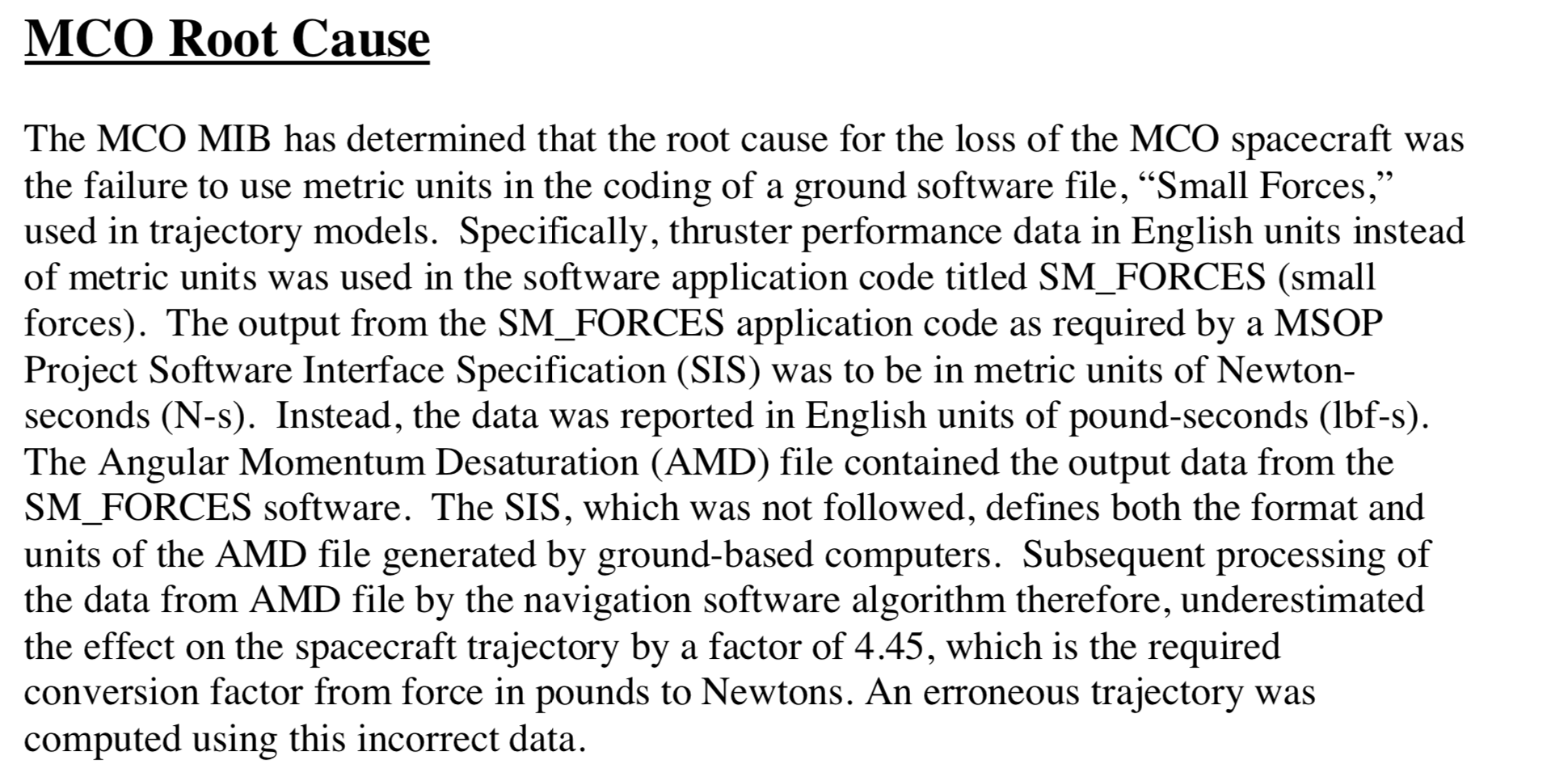
My favorite interface story.
How to capture interfaces
All elements (in our views) have interfaces. All software elements interact with their environment. The architect decides which aspects to document.
An element’s interface is separate from its implementation. We often have multiple elements that provide the same interface.
An element can have multiple interfaces.
An interface can be documented for a single element, a collection of elements (such as a layer), or an entire system.
Interfaces
Elements not only provide interfaces but also require interfaces. An element makes use of other elements’ resources or assumes that its environment behaves in a certain way.
Multiple actors may interact through an interface at the same time. Some interfaces don’t allow this because of synchronization and multi-threading issues. Make that clear in the interface documentation.
Interface template
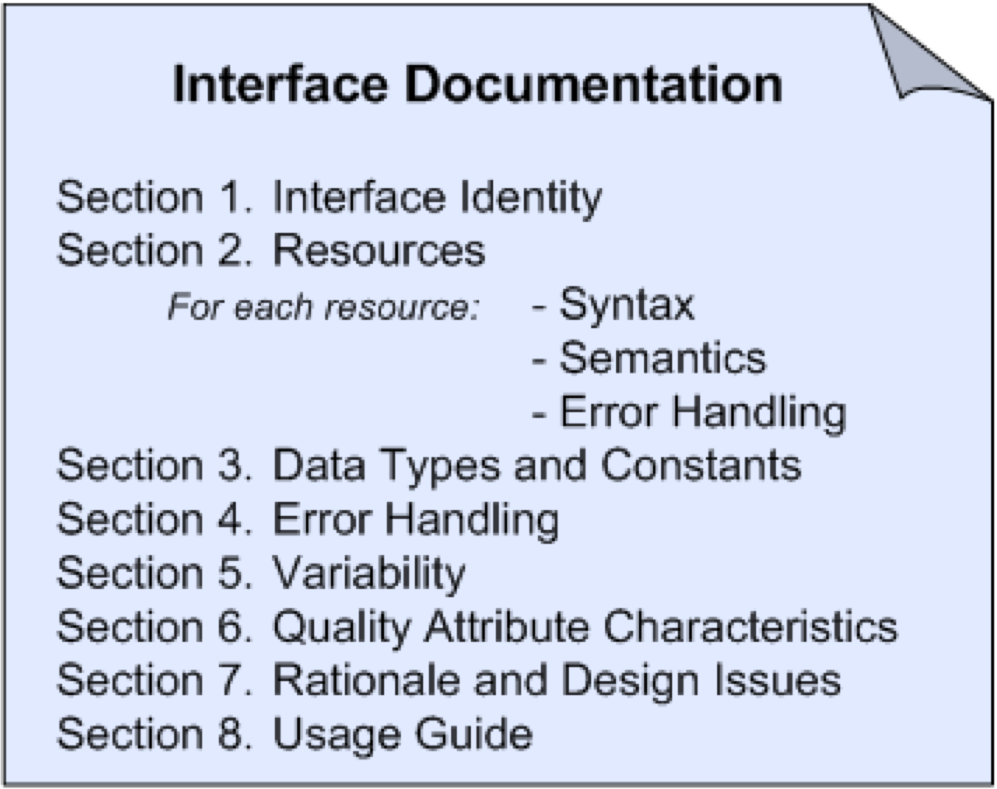
Template (1)
Interface identity—some obvious name. This is not easy; it is as hard as naming a method or an object. It should be memorable and perspicuous.
Resources provided:
- Syntax: this is like a method signature. We can also use standards designed specifically for this, such as Interface Defn Languages (IDL) or Web Service Defn Languages (WSDL). Where would JSON or YAML or Protobuffers fit?
- Semantics: effects of using the resource. Usage restrictions; pre/post conditions; values assigned; whether the resource changes or not (idempotence); new properties observed after the interface is used. We can use natural language, behavior diagrams, or formal languages (e.g. timing diagrams). As usual, there are tradeoffs of precision and cost. How important is it that you know what units you are getting trajectory fixes in?
- Error handling: what happens when something goes wrong. E.g., does the resource revert back (rollback) to its initial state.
Template (2)
- Data types: what do we mean when we say “String”? What is a “Customer”?
- Error handling (overall)
- Variability: how the interface may change, e.g., if peak load restrictions are exceeded.
- Quality attributes: e.g., performance impacts possible.
- Rationale: Why the interface was designed this way.
- Usage Guide: Most important of all; how to actually use the interface with usage examples.
Informal
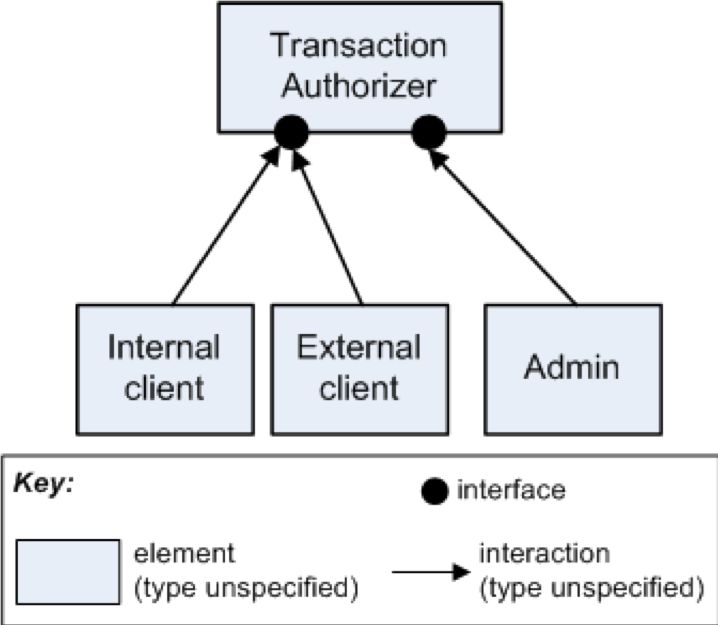
Explicitly
We can ‘reify’ our interface as a separate class altogether. In Java, for example, this is accomplished with the Interface language feature.
We can use lollipops and sockets as well (again, in the primary presentation).
Group Exercise
Use the template following to capture the interface documentation for the following scenarios. The scenarios share the common theme that the current docs are terrible; your job is to improve it. Make whatever assumptions you need to make the problem simpler. The idea is to document the interface that this module provides, rather than spending time improving or ironing out details of the design.
Groups 1-9 - Scenario 1 - Groups 10-16 - Scenario 2
Scenario 1
Your team needs to specify the interface for a module that does credit card transaction processing:
authorize(in cc_number, in amount, in cvc_number, out status, out authNumber)
Scenario 2
Your team is maintaining the star tracker for a military satellite. You send current position to the rest of the satellite systems, enabling communications, course correction, etc.
SEND_CUR_POS(in x, in y, in z, in time, out status)
API Design
APIs vs Interfaces
An API (Application Programming Interface) is now essential to most modern web-facing software. An API is the external collection of interfaces, i.e., interfaces for external tools and users.
This might be another team in the org (e.g Amazon), or anyone who signs up (Github).
MCP servers are a new arrival in the interface world. They also expose your internal services to the world, and come with security and maintenance questions.
API Design
Key qualities to consider:
- How do I get external people access to my systems, securely?
- What expectations do I set for these users around uptime/availability, performance?
- How do I version my APIs so they a) see use and b) can be maintained?
- What is important to expose in the API, and what doesn’t need to be exposed?
REST
The vast majority of APIs we see are REST(ish).
REST = Representational State Transfer, and underpins the modern web system. REST is a design pattern/architectural style. See Fielding’s thesis.
HTTP Verbs: GET/POST/DELETE/ etc. + data representation (the resource in URL), nearly always Javascript Object Notation (JSON).1
REST
All the client MUST know is how to get the first resource.
REST specifies the subsequent operations should be part of the resource being retrieved (loosely coupled).
Operations are be idempotent: the state of the world is the same after one invocation or many (web-scale).
Standard verbs = simplified architectural choices. You modify resources through the verbs, making this a data-centric style.
Good APIs (Bloch)
- Easy to learn
- Easy to use, even without documentation
- Hard to misuse
- Easy to read and maintain code that uses it
- Sufficiently powerful to satisfy requirements
- Easy to extend
- Appropriate to audience
Designing RESTful APIs
- An Interface does one thing, well (naming!)
- As (conceptually) small as possible
- Does not let implementation leak into interface
- Well documented and explained
- Considers performance
- Reports errors clearly
- Test!
Summary
- Capture interfaces as part of architectural design
- Interface: how clients interact with your services
- Interfaces are a key part of the modern web
- APIs for external users need careful thought to ensure proper use and maintainability.
- REST is an architectural style that permeates modern app development that uses APIs over internet.
API references

Neil Ernst ©️ 2024-5