difference between design patterns and architecture styles
the Singleton pattern
What and Why
Designing software is hard, designing reusable and flexible software is even harder
Design Patterns – an attempt to build on others’ experience in solving recurrent problems
Contrast with architectural style: implications for many modules
A borrowed concept
Each pattern describes a problem that occurs over and over again in our environment, and then describes the core of the solution to that problem, in such a way that you can use this solution a million times over, without ever doing it the same way twice” – Christopher Alexander, A Pattern Language
A Design Pattern
Has four essential elements:
pattern name
problem that describes when to apply the pattern
solution that describes the elements that make up the design, their relationships, responsibilities and collaborations
consequences – the results and tradeoffs of applying the pattern (e.g. impact on QA like system’s flexibility, extensibility, portability).
Purposes of Patterns
hide details of element creation from clients
connect objects to minimize coupling / dependency
encapsulate behaviors that may change at runtime / for a given context
Example Pattern: The Singleton Pattern
It is perhaps the simplest of all the patterns…
… yet also one of the most subtle.
It is all about instantiating one and only one object.
Some objects we need only one of (printer spooler, caches)
It is a convention for ensuring one and only one object is instantiated.
And it does not have many of the downsides of globals.
What is this?
public MyClass {privateMyClass(){}}
It is a class that apparently cannot be instantiated! But that’s not really true…
What is that?
public MyClass {publicstatic MyClass getInstance(){}}
It is a vanilla static method… But combined together with the previous, it gives us…
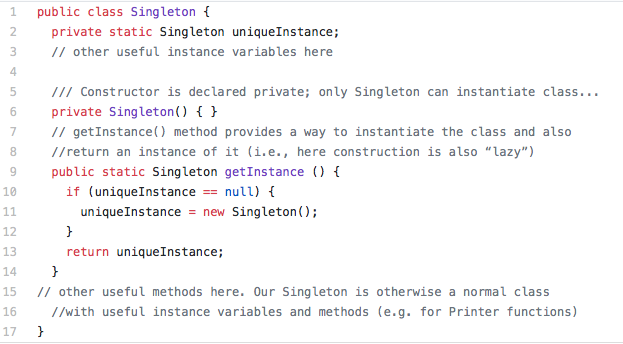
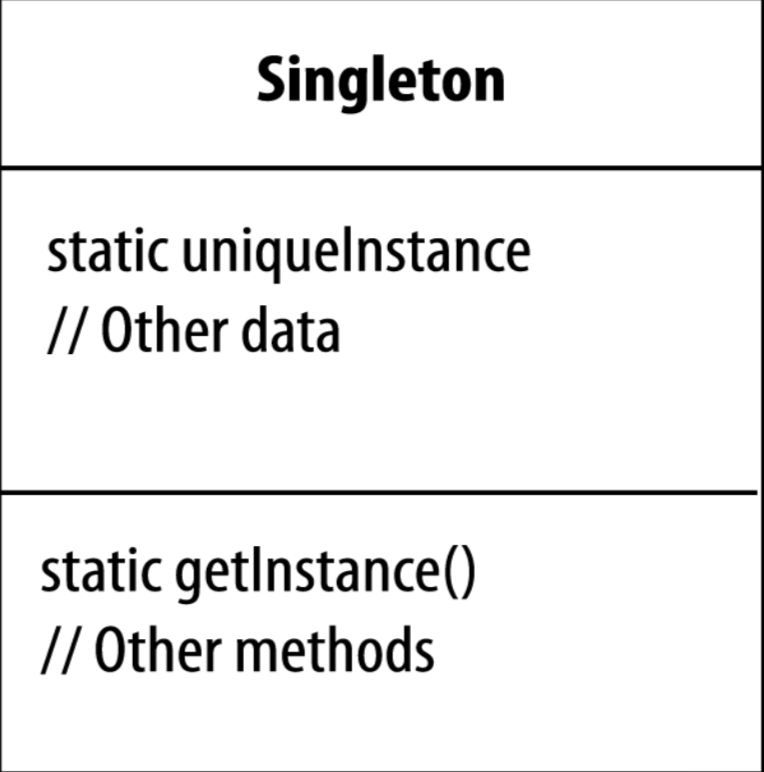
Classic Singleton Pattern
Singleton defined
The Singleton Pattern ensures a class has only one instance, and provides a global point of access to it.
The getInstance() method is static therefore you can conveniently access this method anywhere in your code using Singleton.getInstance().
The uniqueInstance class variable holds our one and only instance of Singleton.
That’s just as easy as accessing a global variable, but we get benefits like lazy instantiation from the Singleton.
Example: Logger
Suppose we need to implement a “Logger” class – records activities performed by our systems
also records errors generated by system
“log” usually implies one file in one place
But we also require that only one Logger operate at any one time
Otherwise the file associated with logger would be created every single time a Logger is instantiated!
Why bother?
Creating a singleton class is a lot of code!! Why not just use a global variable?
Singleton consequences:
Controlled access to sole instance
Allows lazy allocation (not allocated until / unless needed)
Any potential problems with this approach?
Singleton: caveats?
Singletons do add coupling
A design is not necessarily improved by adding a singleton.
When to implement a class as a singleton:
When every application uses this class exactly the same way, and…
When every application only ever needs one instance of the class
debugging - “where did that thing get called from”
testing - hide dependencies
Caveats
convenience limits good design thinking
maybe the singleton functions can be moved into the class they manage
maybe there is no need for global, public access
Dependency injection?
use sparingly! many devs actively avoid them.
Examples of using Singleton
many printers, one Printer Spooler
many files, one File System
many windows, one Window Manager
can you think of others?
Next steps
Talk about a few other ‘design’ patterns
Learn how to read and interpret patterns
What is a pattern in one language is a language feature in others
often in dramatically less code!
Patterns - Learning Goals
Explain why design patterns are useful and some caveats to consider when using design patterns
Clearly and concisely describe, give examples of software situations in which you’d use, explain the key benefit of, and drawbacks or special considerations for the following patterns:
singleton,
decorator,
observer,
abstract factory
Remember:
In software engineering, a design pattern is a general repeatable solution to a commonly occurring problem in software design.
A design pattern is a description or template for how to solve a problem
Not a finished design
Patterns capture design expertise and allow that expertise to be transferred and reused
Patterns provide common design vocabulary, improving communication, easing implementation & documentation
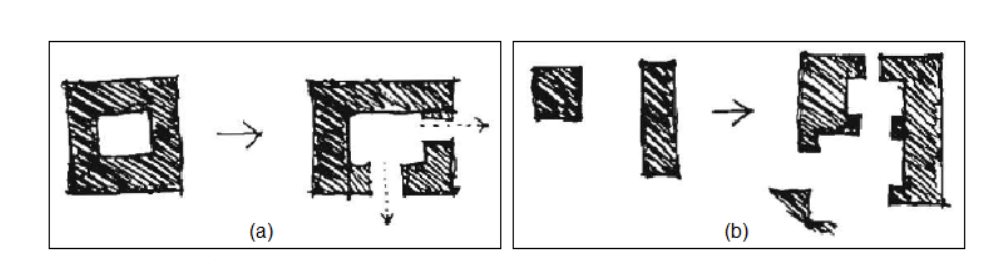
Real World Patterns
Problem: prevent sewer gas backflowing into rooms
Solution: P-trap
Problem: crossing highways
Solution: cloverleaf
Updates - the Observer Pattern
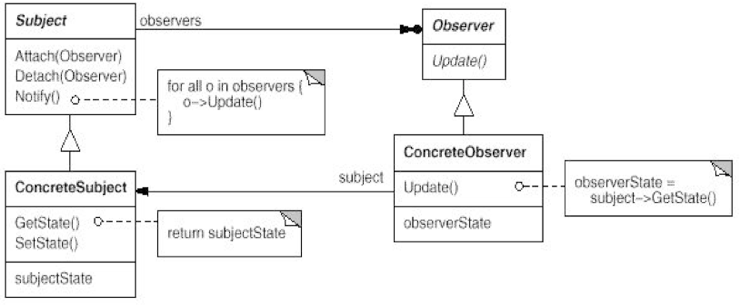
Name: Observer
Intent: Ensure that, when an object changes state, all its dependents are notified and updated automatically.
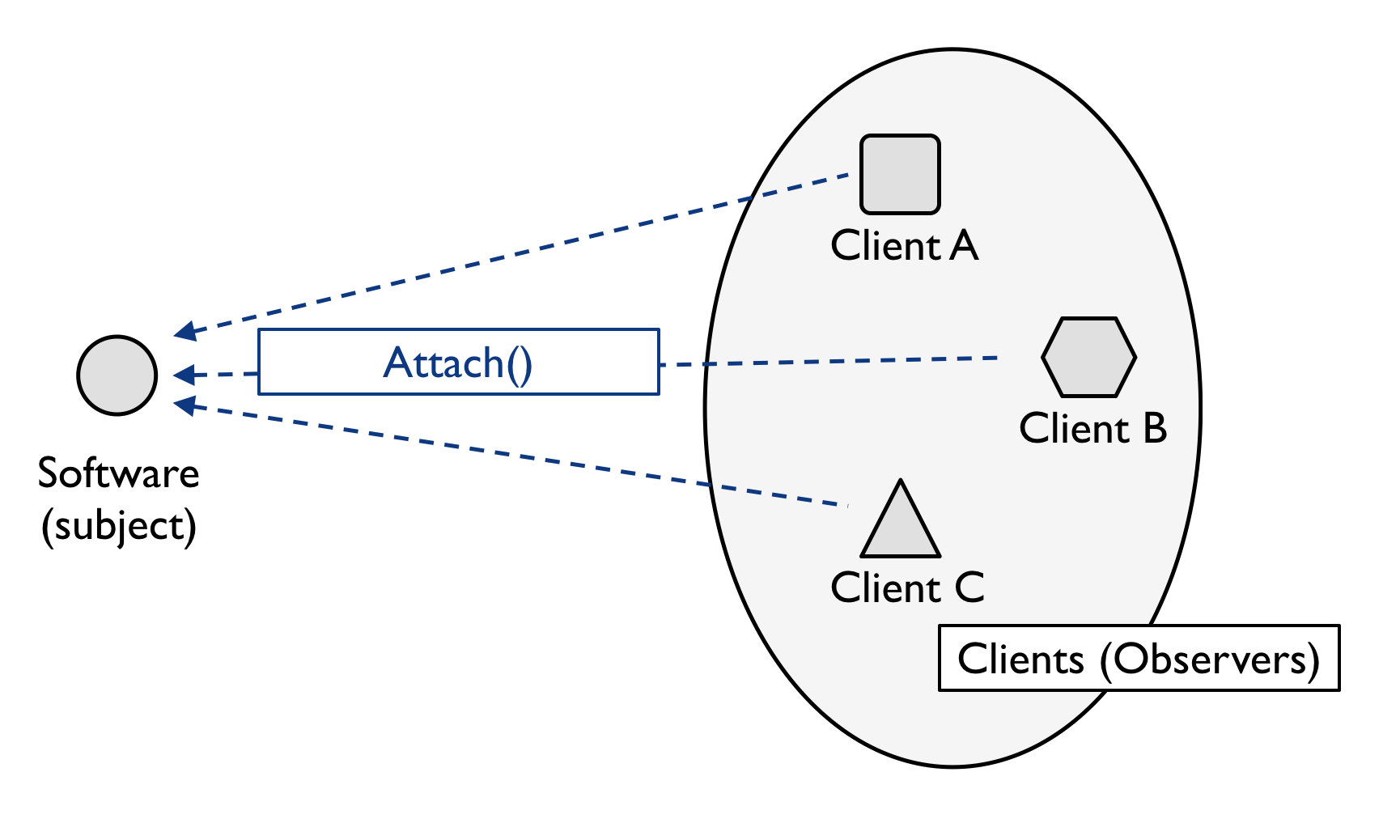
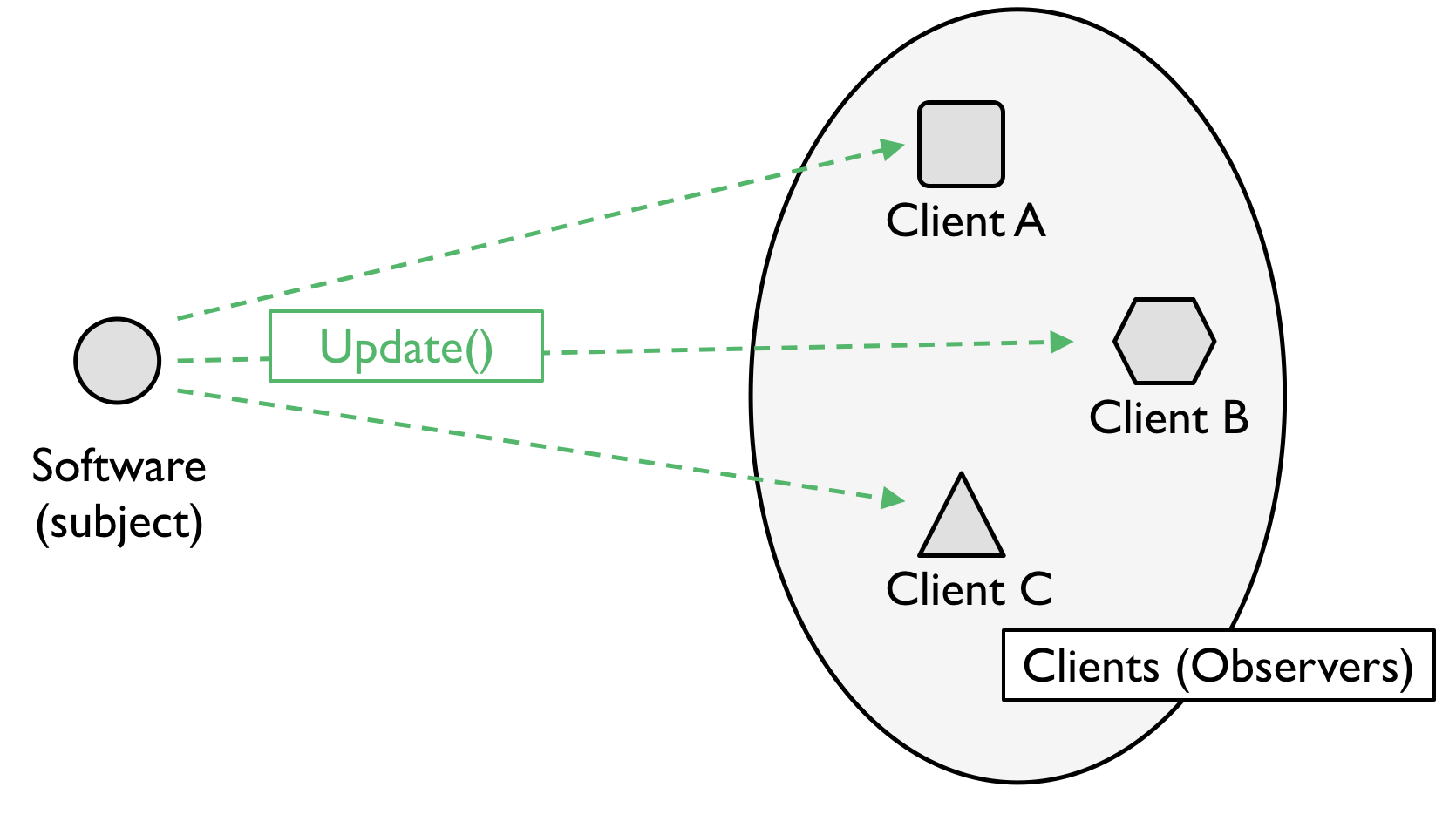
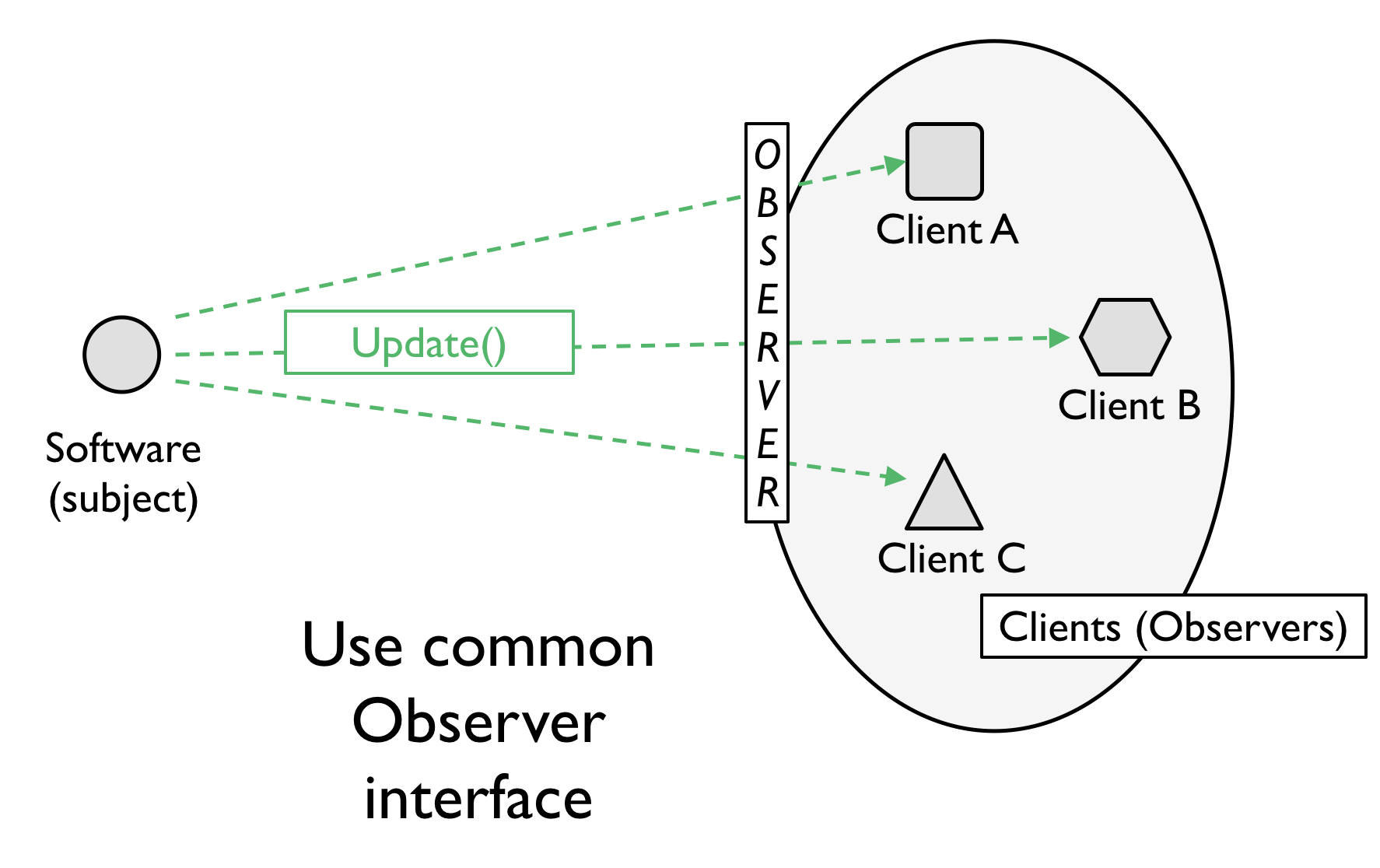
Participants & Structure:
Observer Updates
Observer Updates
Observer Updates
Examples
I need the professor to be notified when a student joins his/her class
I want the display to update when the size of a window is changed
I need the schedule view to update when the database is changed
Design patterns are reusable!
Exercise (5 min)
Use a GenAI tool to create a Python solution to a newsletter service needing to maintain a list of subscribers. Use the Observer pattern.
Once you have some sample code, try to see where you might run into maintainability challenges in the future.
Observer Tradeoffs
‘+’ decouple observer and observable (also known as “publisher/subscriber” or pub-sub)
‘+’ observable/publisher only knows what is listening, not what they do
‘+’ can observe many publishers
‘-’ implicit flow of control means hard to debug
‘-’ list of observers can be unwieldy (FB social graph)
‘-’ questions about how/when/where updates arrive.
Using DP
Part “Craft”
Know the patterns
Know the problem they can solve
know the way to ask AI about the problem
Part “Art”
Recognize when a problem is solvable by a pattern
Part “Science”
Look up the pattern
Correctly integrate it into your code
Knowing Patterns Helps Understand Code
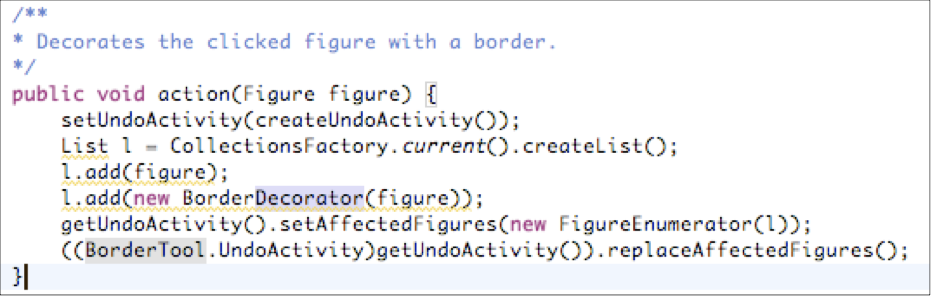
The pattern sometimes convey a lot of information Try understanding this code:
Key is to know the Abstract Factory and Decorator patterns!
A Shared Vocabulary
Dev 1: “I made a Broadcast class. It keeps track of all of its listeners and anytime it has new data it sends a message to each listener. The listeners can join the Broadcast at any time or remove themselves from the Broadcast. It’s really dynamic and loosely-coupled!”
Dev 2: “Why didn’t you just say you were using the Observer pattern?”
Pattern Classification
Creational Patterns
Makes a system independent of how its objects are created
Useful as system evolves: the classes that will be used in the future may not be known now
Structural Patterns
Techniques to compose objects to form larger structures
Behavioral Patterns
Concerned with communication between objects
Describe complex control flow
Creational
Examples
Abstract Factory
Singleton
Factory Method
Prototype
…
Abstract Factory
Problem context:
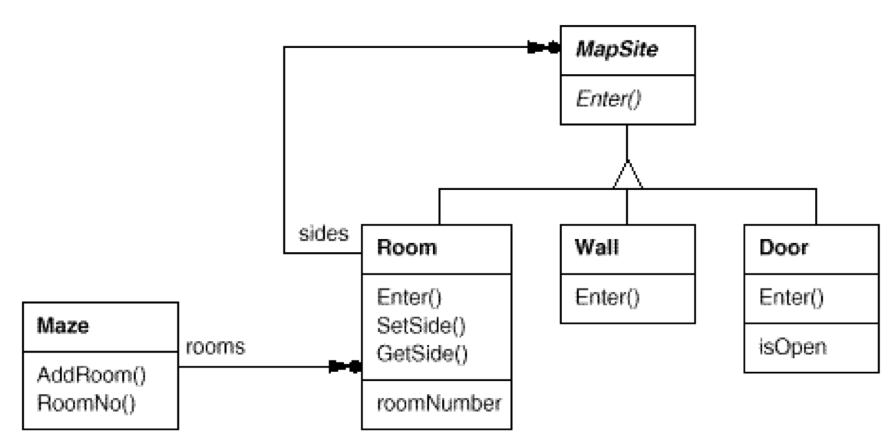
Build a maze for a computer game
A maze is a set of rooms
A room knows its neighbours: room, door, wall
Ignore players, movement, etc.
Maze design
Exercise
Implement the function MazeGame:CreateMaze() to design a maze with 2 rooms and a connecting door.
Update that function to make a Maze containing a Room with a bomb in it.
We can only use this method to create a maze that uses a Room and a Door.
What if we want to create a different type of maze?
The layout is hard-wired
Completely rewrite MazeGame each time (and introduce bugs)
Bug Rates (McConnell)
Industry Average: “about 15 - 50 errors per 1000 lines of delivered code.”
Microsoft Applications 1992 “about 10 - 20 defects per 1000 lines of code during in-house testing, and 0.5 defect per KLOC in released product”
Cleanroom/Code inspection: 3 defects per 1000 lines of code during in-house testing and 0.1 defect per 1000 lines of code in released product
Space-shuttle software - 0 defects in 500 KLOC using a system of formal development methods, peer reviews, and statistical testing.
Abstract Factory
Sample Problem: Your game needs to create rooms, but you are not quite sure yet how these rooms will be implemented and you think they will be extended in the future.
Solution 1:
// TODO: Change next line when we know what is a roomRoom r =newTempRoom();// Note: TempRoom is a subclass of Room
Problem? (any design principle violated?)
Abstract Factory
Solution 2:
// myRoomFactory is an abstract factory!Room r = myRoomFactory.createRoom();
Advantage: Just set myRoomFactory once, then the good room will be created!
Remark: Setting myRoomFactory is Dependency Injection: the class which is dependant on myRoomFactory doesn’t retrieve it, but waits until someone else injects it.
Code Walkthru
AF Tradeoffs
‘+’ control creation of costly concrete classes
‘+’ easy to change factories
‘-’ hard to extend factories
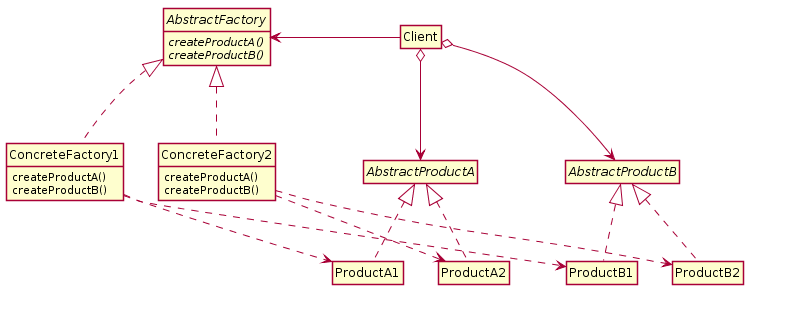
Creation - the Abstract Factory Pattern
Name: Abstract Factory
Intent: Provide an interface for creating families of related or dependent objects without specifying their concrete classes.
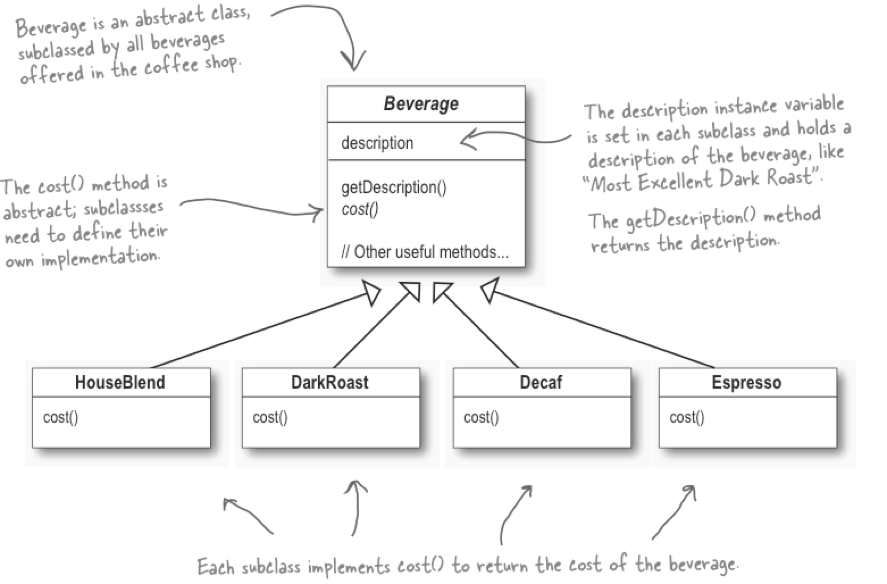
You need to implement a point-of-sale system for a coffee shop. The coffee shop has some basic beverages, but customers can customize their drinks by choosing what kind of milk they want, if they want flavoured syrup, etc.
You could create a class for each drink, but there are so many possible combinations that the number of classes would quickly get out of hand.
Decorator Pattern
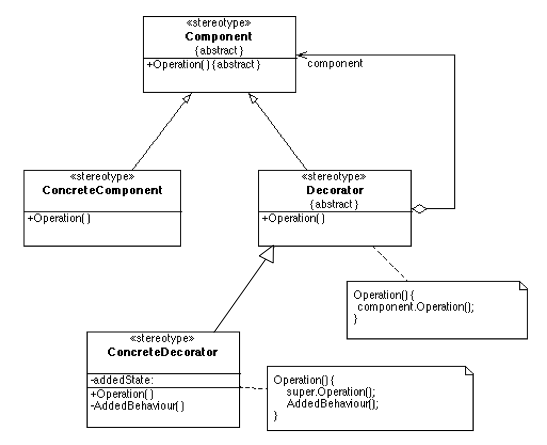
Name: Decorator
Intent: Attach additional responsibilities to an object dynamically
Participants & Structure:
Decorator explained
src: Head First Design Patterns
Decorator JDK code
BufferedInputStream bis =newBufferedInputStream(newFileInputStream(newFile("a.txt")));
Behavioural Patterns
Behavioural examples
Mediator
Observer (already covered)
Chain of Responsibility
Command
Interpreter
Iterator
Memento
State, Strategy, Template Method, Visitor
Wrap up
Design patterns encapsulate reusable solutions to commonly occurring challenges.
Learning the most common ones is important to show awareness of design.
These patterns are mostly OO, but there are others: security patterns, privacy patterns, functional patterns…
e.g. map/reduce, currying, monads
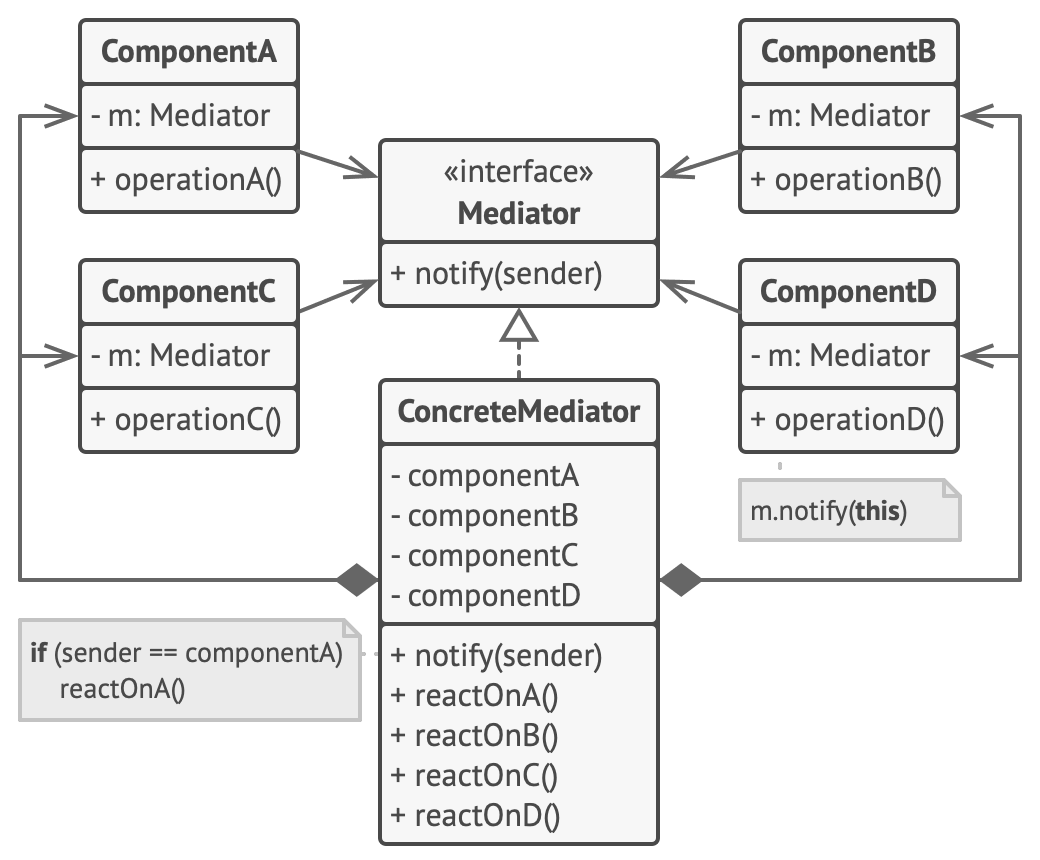
Mediator Exercise
Mediator is a behavioral DP that is useful when many objects communicate with one another.
Mediator redirects communication through itself instead (think about this in terms of coupling and cohesion)
Unlike Observer, connections are many to many through the Mediator.
The mediator can do things like prioritize, scale, analyze the messages.
Enterprise Service Buses (ESBs) and Message Queues (RabbitMQ) are flavours of Mediator.
A message bus is a way to direct communications between components via a centralized messaging object. In our example, we will have Services dynamically register to our Mediator, and different Services respond to Events from the Mediator.
In particular, think about the scenario where users register for our recipe website. Our website will have an AccountService and EmailService. When the user registers, an Event is sent to the Mediator (“UserRegistered”). The Mediator then publishes this event to registered Services.
Each Service then has logic (not specified) to take action on a given event type (e.g., send a welcome email).
(homework?) instantiate your solution in Python/Java/C++. ## Here is the implementation for the Mediator DP.
via https://refactoring.guru/design-patterns/mediator
Reflection
when is this useful?
how does Mediator “know” about the Clients and Services?


 src: Head First Design Patterns