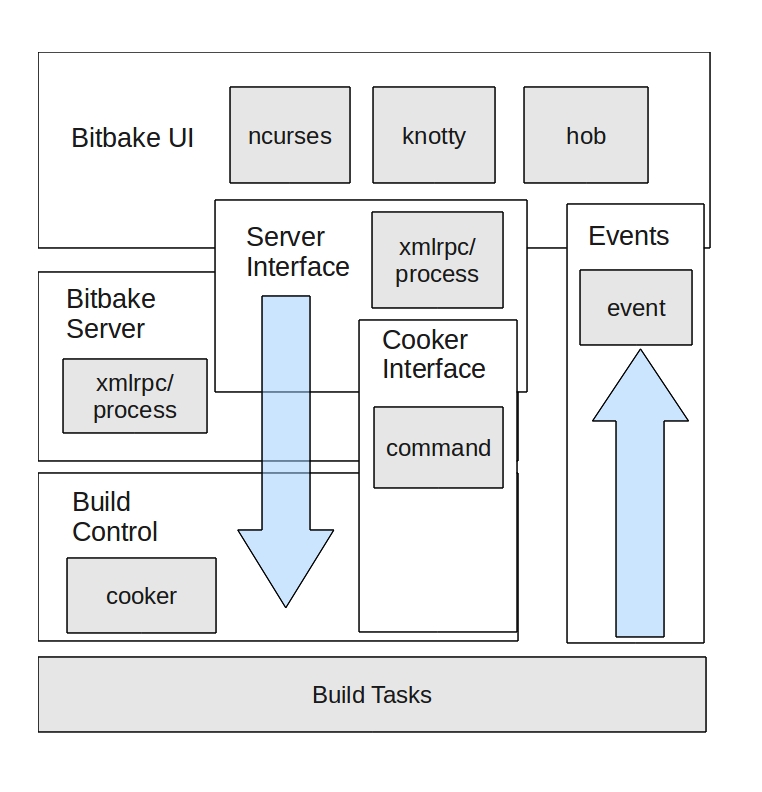
There are three main types of views for showing important architecture structures.
Module views (see notes) - static, implementation time structures
C&C views - dynamic, run time structures
Allocation views (the other stuff)
Representing Views
The style we chose (layers, uses, etc) are often thought of as primary presentations.
A primary presentation is the graphical representation of the view, but does not in itself constitute documentation.
What are some of the problems with doing it that way?
They include
not disambiguating various elements of the diagram;
missing rationale;
missing data points that help answer e.g. latency questions,
capturing strange cases like shutdown behavior,
and other items that would clutter or confuse the diagram.
Component and Connector Views (p. 332)
Elements: components: principal units of runtime interaction and data stores and connectors: interaction mechanisms
Relations: attachment of components’ ports to connectors’ roles (interfaces with protocols)
Properties: name, relevant QA
Why We Care - questions C&C views can answer
Specifying the behaviour that elements must exhibit
Show how the system “works”
Reasoning about runtime system quality attributes such as performance, security, and reliability
What are the major executing components?
Which parts of the system are replicated?
Data Flows
Which parts of the system can run in parallel?
Instances of C&C Views - Styles
Pipe and Filter
Client-Server
Shared Data
Pub-Sub
Service Oriented
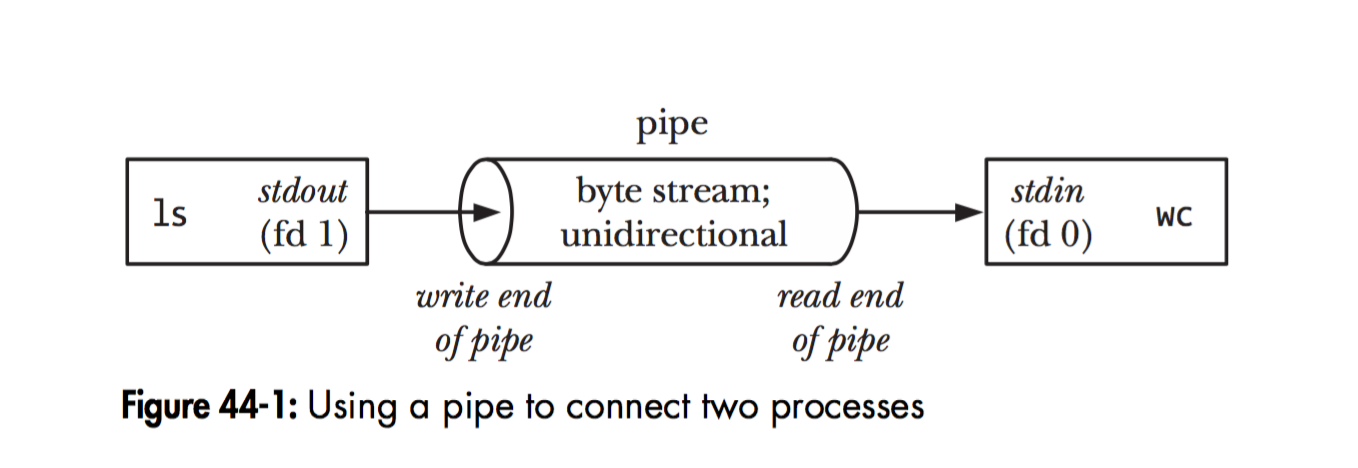
Pipe and Filter
Show dataflow. Filters transform data and pass it along Pipes. Analyze system throughput, function composition.
Elements: Filters, data transducers as components. Pipes as one way data conduits.
Relations: ports connecting pipes and filters.
Constraints: restrict loops and branches.
P&F example from Unix
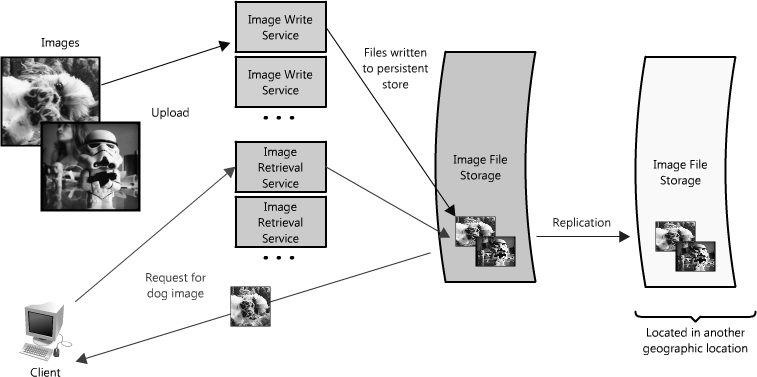
Client-Server
Shows modifiability and reuse possible in a 2 tier architecture. Analyze availability, connections expected, requests, interface needs.
Elements: Client invokes services from Server. Request/reply connector joins them.
Relations: attach client to server
Constraints: number of tiers; how connections are made;
Web scalability image via https://aosabook.org/en/v2/distsys.html
Exercise
With a partner, ask an AI tool to create a client-server diagram for a multiplayer game like Fortnite.
what does this tell you about managing Fortnite’s availability? What information is missing?
what do you think you would want to capture with respect to Interfaces?
The View Template
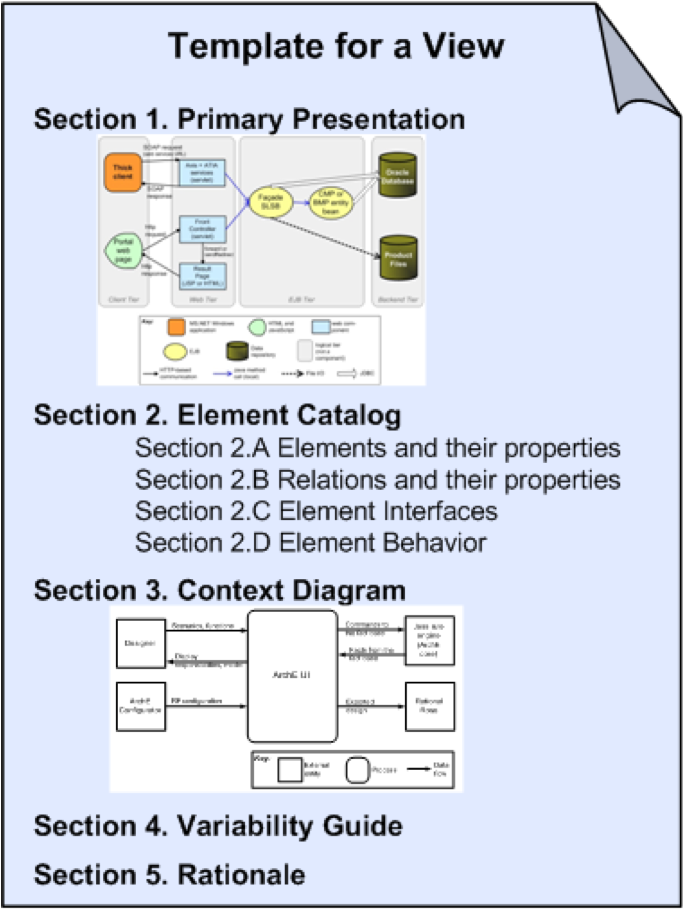
There is more to an architectural view than just the primary presentation/diagram.
view template
Elements of the complete view
Make sure your design phase presents this for the two views:
Primary presentation
Element catalog: names and roles for the entities in the diagram, interface specs between entities , behavior of entities
Context diagram - where this particular view sits within the larger system(s)
Variability guide - how this view might change, special circumstances, etc.
Rationale - more or less what is in the ADR
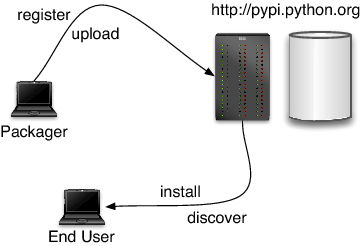
Shared Data
Read and write to a shared data store. Analyze data needs, identify who connects.
Elements: data stores and accessors.
Relations: attachments.
Constraints: how the data is attached via connectors.
Package data via https://aosabook.org/en/v1/packaging.html
Pub-Sub
Decouple listeners from publishers. A very common pattern (e.g. Observer).
Wraps up asynchronous/callback architectures. Helps isolate consumers and producers, analyze decoupling and independence in your architecture.
Elements: publisher and subscribers. Possibly the bus for distributing messages
Relations: attachments.
Constraints: who can listen, message semantics.
Bitbake, showing a combined view (https://aosabook.org/en/v2/yocto.html)
Services and Microservices
Allows for easy interoperability based on common messaging layer. Use robust and proven architectural patterns (REST). Microservices (e.g. at Netflix) are small, independent service providers that belong to a single organization.
Elements: service providers, service consumers, middleware
Relations: typically HTTP messages using the HTTP verbs (GET/POST/DELETE etc) but also SOAP/XML and others
Constraints and challenges: who can consume messages, authentication requirements, observability approach, duplication of functionality
via https://blog.dreamfactory.com/microservices-examples
Summary
C&C views help answer questions around runtime and dynamic system behaviors
We walked through 5 common views
Be careful not to confuse the system dynamic structure, its static structure, with how it behaves.
AI Client-Server
classDiagram
      class GameClient {
          +String playerId
          +PlayerState localPlayer
          +WorldState worldState
          +InputBuffer inputQueue
          +connect(serverId)
          +sendInput(input)
          +receiveUpdate(state)
          +renderFrame()
          +predictMovement()
          +interpolateOthers()
      }

      class GameServer {
          +String serverId
          +List~PlayerState~ players
          +WorldState authoritative
          +int tickRate
          +processInputs()
          +simulatePhysics()
          +validateActions()
          +broadcastState()
          +handleCollisions()
          +applyStormDamage()
      }

      class MatchmakingService {
          +Queue playerQueue
          +List~GameServer~ servers
          +findMatch(player)
          +createInstance()
          +assignPlayers()
          +monitorHealth()
      }

      class PlayerState {
          +Vector3 position
          +Vector3 velocity
          +float health
          +float shield
          +Inventory inventory
          +int eliminations
          +updatePosition()
          +takeDamage()
          +useItem()
      }

      class WorldState {
          +List~PlayerState~ players
          +List~Building~ structures
          +StormCircle storm
          +List~Loot~ items
          +int tick
          +update()
          +serialize()
      }

      class Building {
          +Vector3 position
          +BuildingType type
          +float health
          +String ownerId
          +takeDamage()
          +destroy()
      }

      class StormCircle {
          +Vector3 center
          +float radius
          +float damagePerTick
          +shrink()
          +isInStorm(position)
      }

      class DatabaseService {
          +saveMatchResults()
          +loadPlayerData()
          +updateStats()
          +saveCosmetics()
      }

      class NetworkManager {
          +sendReliable(data)
          +sendUnreliable(data)
          +handleLatency()
          +compressData()
      }

      GameClient "100" --> "1" GameServer : connects to
      GameServer "1" --> "*" GameClient : broadcasts state to
      MatchmakingService "1" --> "*" GameServer : manages
      MatchmakingService "1" --> "*" GameClient : assigns to server
      GameServer "1" --> "1" WorldState : maintains
      GameClient "1" --> "1" WorldState : local copy
      WorldState "1" --> "*" PlayerState : contains
      WorldState "1" --> "*" Building : contains
      WorldState "1" --> "1" StormCircle : contains
      GameServer "1" --> "1" DatabaseService : persists to
      GameClient "1" --> "1" NetworkManager : uses
      GameServer "1" --> "1" NetworkManager : uses
  classDiagram
      class GameClient {
          +String playerId
          +PlayerState localPlayer
          +WorldState worldState
          +InputBuffer inputQueue
          +connect(serverId)
          +sendInput(input)
          +receiveUpdate(state)
          +renderFrame()
          +predictMovement()
          +interpolateOthers()
      }

      class GameServer {
          +String serverId
          +List~PlayerState~ players
          +WorldState authoritative
          +int tickRate
          +processInputs()
          +simulatePhysics()
          +validateActions()
          +broadcastState()
          +handleCollisions()
          +applyStormDamage()
      }

      class MatchmakingService {
          +Queue playerQueue
          +List~GameServer~ servers
          +findMatch(player)
          +createInstance()
          +assignPlayers()
          +monitorHealth()
      }

      class PlayerState {
          +Vector3 position
          +Vector3 velocity
          +float health
          +float shield
          +Inventory inventory
          +int eliminations
          +updatePosition()
          +takeDamage()
          +useItem()
      }

      class WorldState {
          +List~PlayerState~ players
          +List~Building~ structures
          +StormCircle storm
          +List~Loot~ items
          +int tick
          +update()
          +serialize()
      }

      class Building {
          +Vector3 position
          +BuildingType type
          +float health
          +String ownerId
          +takeDamage()
          +destroy()
      }

      class StormCircle {
          +Vector3 center
          +float radius
          +float damagePerTick
          +shrink()
          +isInStorm(position)
      }

      class DatabaseService {
          +saveMatchResults()
          +loadPlayerData()
          +updateStats()
          +saveCosmetics()
      }

      class NetworkManager {
          +sendReliable(data)
          +sendUnreliable(data)
          +handleLatency()
          +compressData()
      }

      GameClient "100" --> "1" GameServer : connects to
      GameServer "1" --> "*" GameClient : broadcasts state to
      MatchmakingService "1" --> "*" GameServer : manages
      MatchmakingService "1" --> "*" GameClient : assigns to server
      GameServer "1" --> "1" WorldState : maintains
      GameClient "1" --> "1" WorldState : local copy
      WorldState "1" --> "*" PlayerState : contains
      WorldState "1" --> "*" Building : contains
      WorldState "1" --> "1" StormCircle : contains
      GameServer "1" --> "1" DatabaseService : persists to
      GameClient "1" --> "1" NetworkManager : uses
      GameServer "1" --> "1" NetworkManager : uses
This class diagram shows:
GameServer: Authoritative server that processes all game logic
GameClient: Player’s local game client with prediction/interpolation
MatchmakingService: Creates game instances and assigns players
WorldState: Complete game state (authoritative on server, replicated to clients)
PlayerState: Individual player data (position, health, inventory)
NetworkManager: Handles client-server communication
DatabaseService: Persists match results and player data
The key relationships show that multiple clients connect to one server, the server maintains the authoritative world state, and clients keep local copies for rendering.